Photo Enhancer
Enhance photo quality with AI — sharpen, denoise, and upscale to 4K
Verifying that you are human… Log in to unlock
Loading the selected model’s credit cost… Credit rules
Your existing credits remain available. We do not add a watermark to edited results.
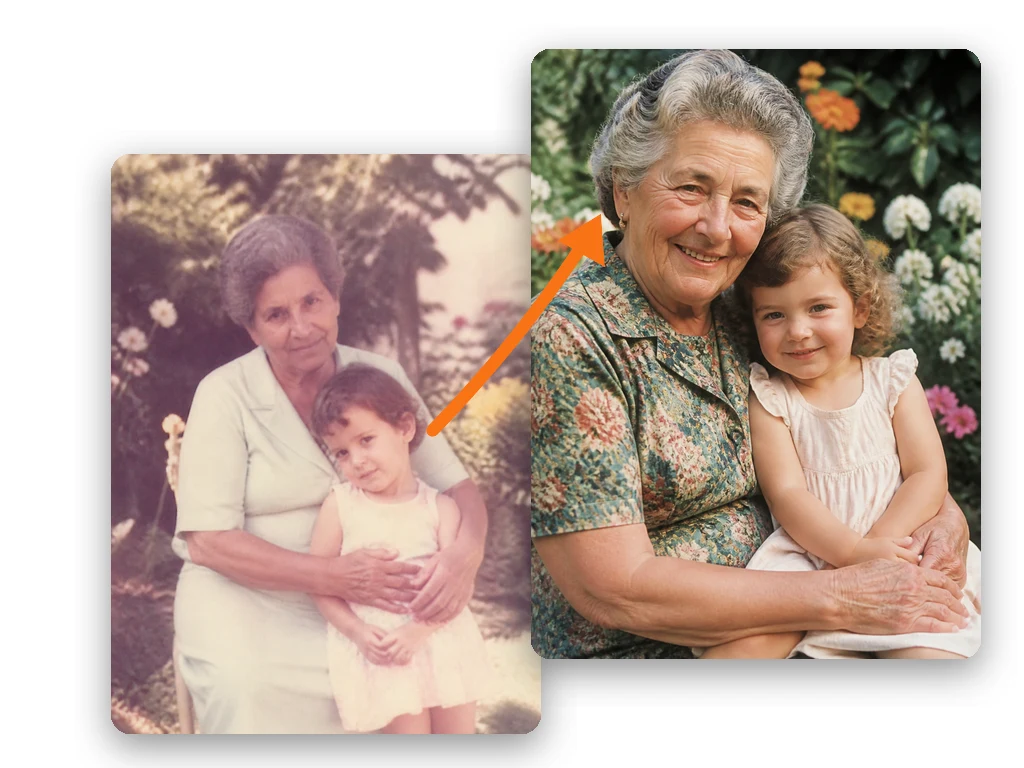
Use this photo enhancer to bring out clearer details in your pictures. Our AI image enhancer helps sharpen, denoise, and brighten your upload, with output up to 4K depending on the selected model.
How to Enhance a Photo in 3 Steps
Upload your photo
Drag and drop an image, click to upload, or paste with Ctrl+V (⌘V on Mac). PNG, JPEG, WebP, and HEIC are supported, up to 25MB per image.
Choose 1K, 2K, or 4K
Choose a model and supported output size. The enhancement instructions are already filled in; adjust them if needed and check the credit cost before submitting.
Download as PNG
Review the enhanced image in the preview, then download your result as PNG. Failed generations automatically return the credits used for that task.
What Photo Enhancer Can Fix
- Blurry photos
- Improve soft edges and recover clearer-looking detail in portraits, everyday snapshots, and product photos. Results depend on the source image.
- Noisy photos
- Reduce grain and color noise while aiming to retain natural textures in skin, fabric, and other fine details.
- Low-light photos
- Lift dark areas and improve visibility in indoor, evening, or underexposed photos without intentionally changing the scene.
- Old photos
- Refresh faded scans and soften visible wear. Ask for scratch repair or color recovery while preserving the original faces and composition.
1K vs 2K vs 4K — Which Should You Choose
- 1K
- For avatars, profile pictures, and images on the web.
- 2K
- For small prints and images that need a little more detail.
- 4K
- For posters, larger images, and layouts that need more pixels.
Available sizes depend on the selected model and account access. Some models use pixel dimensions and Quality settings instead of 1K / 2K / 4K tiers. Print quality also depends on the original photo and print size.
4K processing can use more credits. The credit cost for your selection is shown before you submit.
Frequently Asked Questions
Is this photo enhancer free?
Verify your email to claim your welcome credits: 1 per new account, once only. After those credits are used, continue with a subscription or credit pack. Failed generations automatically refund the credits used. View plans and credit packs.
How much can it upscale?
Up to 4K with a supported model and account access. Choose the available resolution or pixel size in the editor before submitting.
What image formats do you support?
PNG / JPEG / WebP / HEIC, up to 25MB per image. Upload by dragging and dropping, clicking, or pasting with Ctrl+V (⌘V on Mac). Results download as PNG.
Will enhancing change how my photo looks?
The enhancement preset focuses on clarity and detail while aiming to preserve your subjects, composition, and content. AI may reconstruct details, so review the result before using it.
Can I use the result commercially?
You retain rights in content you lawfully own. Commercial use requires the necessary rights, permissions, and consents for your image and intended use; output is not guaranteed to be unique or free of third-party claims. Review the applicable terms before use. Terms of Service.
Want to replace a background too? Try our image background changer.